ZRA Smart Invoice, built into the till.
Our point of sale sends each fiscal sale to ZRA Smart Invoice from the counter, registers new products with ZRA on their first sale, and prints the ZRA receipt details on the bill. Your cashiers keep billing the way they do today. We can also connect your existing POS or ERP.
Smart Invoice compliance without slowing the counter
ZRA Smart Invoice is the Zambia Revenue Authority's electronic invoicing system. Every fiscal invoice has to reach ZRA and carry ZRA's details back on the receipt. We built that into the till itself, so compliance happens as a side effect of billing.
Sent from the till
Each fiscal sale goes from the counter PC to ZRA Smart Invoice through a Smart Invoice integration provider. Head office never has to re-send anything by hand.
Products registered for you
ZRA must know a product before it appears on an invoice. The till registers each new product with ZRA the first time it is sold, then sends the sale.
Keeps billing offline
If the internet drops, the sale is saved on the till and queued. It goes to ZRA automatically when the line is back, and the queue shows what is still waiting.
ZRA details on the receipt
The printed bill carries the ZRA receipt number, signature and verification link, on 80 mm thermal or A4 invoice paper.
One POS, each country its own print
The same software fiscalises with ZRA in Zambia and ZIMRA in Zimbabwe. Each country has its own receipt layout, so a change for one never touches the other.
Books that match ZRA
Prices go to ZRA VAT-inclusive with the correct tax category, and the same sale posts to your stock ledger and double-entry accounts, so your VAT figures agree.
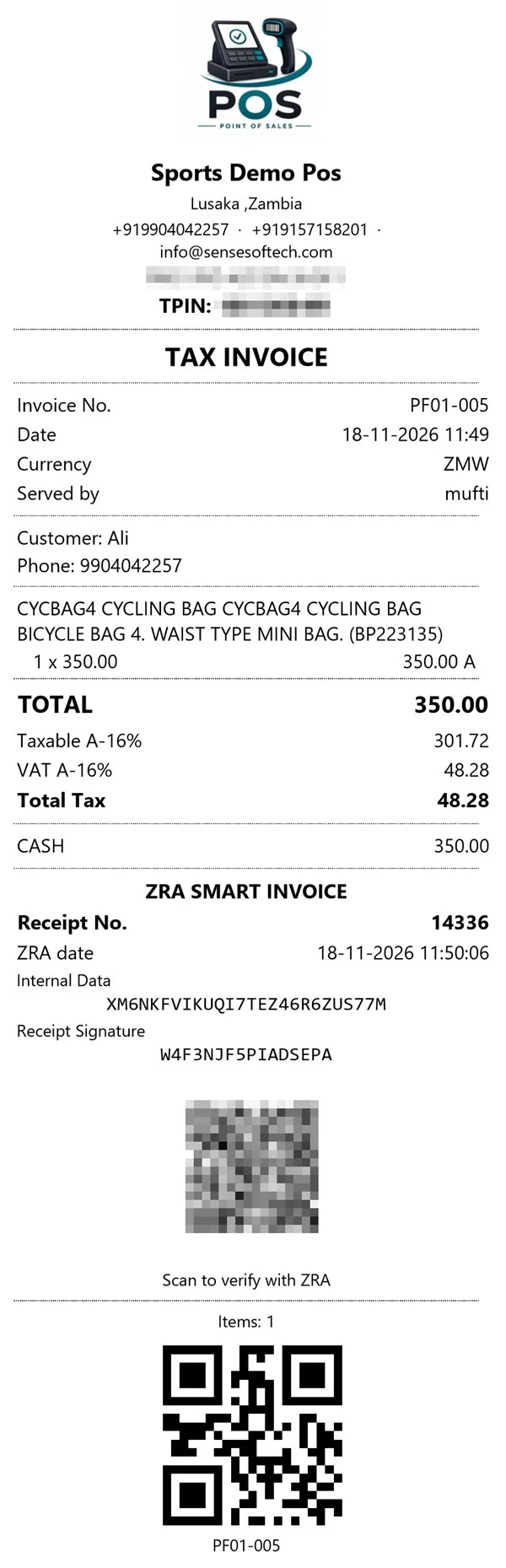
What a ZRA Smart Invoice receipt from our POS looks like
This bill was sent to ZRA Smart Invoice the moment it was saved. Everything in the ZRA section came back from ZRA for this sale and printed on the same 80 mm receipt.
- Tax invoice headerYour shop name, contact details and TPIN at the top, as a tax invoice should carry.
- VAT by ZRA tax categoryEach line is marked with its category, and the taxable amount and VAT are shown per category: here A, standard rate 16%.
- ZRA receipt number and dateIssued by ZRA for this invoice, with the exact time ZRA recorded it.
- Internal data and receipt signatureZRA's codes that prove the invoice is genuine and has not been altered.
- Scan to verify with ZRAYour customer scans the QR code to check the invoice on ZRA's own system.
- Invoice QR for the counterOur own code with the invoice number, so a return or reprint is found in one scan.
From the scan to the signed receipt
The cashier does nothing new. Everything below happens between pressing Save and the receipt coming out of the printer.
Bill at the counter
Scan or search the products, take payment in Kwacha, dollars or mobile money, and save as usual.
Product check
Any product ZRA has not seen yet is registered with its item class, type and unit, and the till waits for ZRA to accept it.
Invoice to ZRA
The sale is sent to ZRA Smart Invoice and the till collects ZRA's receipt number, internal data and signature.
Signed receipt
The bill prints with the ZRA details. If the line was down, it is sent from the queue as soon as the internet returns.
Use our POS, or keep your own system
Move to Sense Softech POS
An offline-first Windows till with a head-office web app: multi-branch stock, purchases, transfers, two currencies on one bill and branch P&L, with ZRA Smart Invoice already inside.
See the point of saleConnect your existing POS or ERP
If your software is built on .NET and SQL Server, we can add ZRA Smart Invoice to it: product registration, invoice sending, the offline queue and the receipt layout, inside your own codebase.
See ERP modernisationTested on ZRA's sandbox first, then switched to live
We prove every till against the ZRA Smart Invoice test environment before your first live invoice, so nothing reaches ZRA until your products, tax categories and receipts are right.
-
Set-upYour ZRA integration key, item classes, tax categories and receipt layout per shop.
-
Sandbox testTest sales from your own tills to the ZRA test environment, checked receipt by receipt.
-
Go liveSwitch each shop to live when it is ready, with the queue watched for the first days.
-
Support after go-liveThe team that wrote the integration answers when a sale will not fiscalise.
Talk to us about ZRA Smart Invoice
Tell us how many shops and tills you have, and what you bill with today. We reply within one working day.
ZRA Smart Invoice: frequently asked questions
What is ZRA Smart Invoice?
ZRA Smart Invoice is the Zambia Revenue Authority's electronic invoicing system. A business that ZRA requires to use it sends each fiscal invoice to ZRA, and the printed invoice carries ZRA's receipt number and signature so the sale can be verified.
Which POS software works with ZRA Smart Invoice?
Sense Softech POS has ZRA Smart Invoice built in. The Windows till sends each fiscal sale to ZRA through a Smart Invoice integration provider, registers new products with ZRA automatically and prints the ZRA receipt details on the bill, on 80 mm or A4 paper.
Can you integrate ZRA Smart Invoice into our existing POS or ERP?
Yes, if it is built on .NET and SQL Server, which covers most custom systems in Zambia. We add product registration, invoice sending, an offline queue and the ZRA receipt layout inside your own codebase, and test it against the ZRA sandbox before going live.
What happens to ZRA Smart Invoice when the internet goes down?
Billing continues. The sale is saved on the till and queued, and it is sent to ZRA automatically when the connection returns. The queue shows any sale that is still waiting, so nothing is lost or forgotten.
Do products have to be registered with ZRA before they are sold?
Yes, ZRA must know an item before it appears on an invoice. Our till registers each new product with ZRA the first time it is sold, waits for ZRA to accept it, and then sends the sale, so cashiers never have to register items by hand.
Does the receipt show the ZRA details?
Yes. The fiscal receipt prints the ZRA receipt number, the signature and the verification link that ZRA returns, in a layout made for Zambia. Thermal 80 mm and A4 invoices are both supported.
Do you also handle ZIMRA fiscalisation in Zimbabwe?
Yes. The same POS fiscalises with ZIMRA in Zimbabwe. Each country has its own receipt layout and settings, so ZRA work in Zambia never changes how a Zimbabwe till behaves.
How long does a ZRA Smart Invoice set-up take?
For a shop already on our POS it is mainly configuration: your integration key, item classes, tax categories and the receipt layout, then a sandbox test before switching to live. Connecting another company's software takes longer and we quote it after seeing the system.
Get your tills ready for ZRA Smart Invoice.
Tell us how many shops and tills you have. We will show you a fiscal sale from the counter to the signed receipt.